Genealogy Records in Greenville County open a fast path to family roots, letting you pull birth, marriage, death and census files from the county’s public archives. The searchable database links vital certificates, deed logs and probate files, so researchers can confirm ancestor dates without endless trips to the courthouse. By cross‑referencing city directories, voter lists and military drafts, you gain a clearer picture of each generation’s movements and name changes.
Genealogy Records search tools also tap Greenville County historical newspapers and cemetery indexes, helping you locate obituaries or burial plots that fill gaps left by missing birth indexes. When variant spellings appear, the system flags possible matches and suggests probate or land deeds for verification. This layered approach reduces conflicting dates and builds a reliable family tree that can be shared with relatives or added to online ancestry platforms.
How to Search Genealogy Records
Genealogy Records searches in Greenville County can begin with South Carolina birth, death, marriage, and divorce entries, then continue through deeds, probate cases, census schedules, and local archives. Individuals can also check marriage records to verify relevant details. The South Carolina Department of Public Health portal covers statewide event records; county deeds, probate papers, and many local collections sit with other offices. Search results create candidate identities rather than proof of every family tie. A dependable family tree grows as separate records confirm each person, place, date, and relationship.
Official Search Portal: https://dph.sc.gov/public/vital-records
Steps to Search
- Choose one event type. Open the category for birth, death, marriage, or divorce from the portal page. Searching one event at a time prevents names and dates from different people becoming mixed in a single result set.
- Set the event place and date range. Enter the county where the event occurred, then use the years that fit the ancestor’s lifetime. Search the most likely year first and widen the range after checking nearby years.
- Enter names as supplied. Start with the surname and given name, then add a spouse, parent, or file number when the form requests those fields. Leave uncertain fields blank so the search can return more candidates.
- Test spelling variations. Try a shortened surname, a given-name initial, or a middle name used as a first name. Each result remains a candidate until its birth year, event place, and relatives match the timeline already known.
- Compare the result rows. Check every visible name, date, county, parent, spouse, and file number. A common surname alone provides a weak clue, while a matching parent name or exact event date carries more weight.
- Open the selected entry. Review any image or event summary offered by the portal and compare it with your notes. Look for stamps, annotations, file numbers, and stated relationships that may not appear in the result list.
- Follow the current copy or order path. The portal may direct you to an ordering service. Before paying, review the agency name, requested record type, delivery method, and total cost. A search result may not include a downloadable image, and a purchased file may be an official certified copy rather than a free preview.
- Save a source note before moving to another collection. Record the names, event type, date, place, file or certificate number, and URL. Use those details to test the same person against deeds, probate papers, census schedules, directories, and obituary notices.
Greenville County Genealogy Record Search
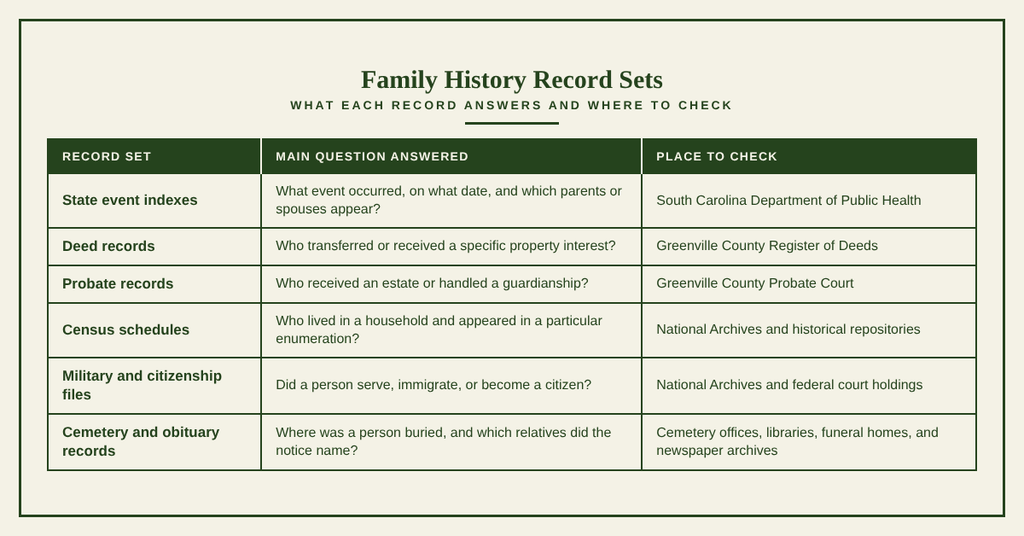
Greenville County genealogy records are divided among state indexes, county offices, federal collections, libraries, cemeteries, and private archives. There is no single Greenville County genealogy database that contains every birth, death, land sale, household, and family event. A productive search starts with the record type most likely to answer the current question, then moves to a second collection that tests the same person from a different angle.
Birth, Death, Marriage, and Divorce Certificates and Index Logs
South Carolina event records can supply direct proof of a birth, marriage, or death when the file falls within the current availability rules. Index logs can show a surname, given name, event date, parents, spouse, or file number before a full copy is ordered. Search fields vary by event, so use the labels shown for each form rather than expecting one field set for every record type.
- Birth records can identify the full name, date and place of birth, parents, and certificate or file number.
- Death records can state the date and place of death, age, birthplace, informant, burial location, and certificate number.
- Marriage records can connect spouses and their parents while distinguishing a license date from the ceremony date.
- Divorce records can identify spouses, the decree date, and a court or case number.
Read Certificates as Clues to Relationships
A birth record may identify parents, a marriage record may connect spouses and their parents, and a death record may name an informant, surviving spouse, or burial place. A delayed birth filing can carry a reported date that differs from the date on a later death certificate. Record each date as reported and seek a second source before choosing the date placed in a family tree.
Deeds, Property, and Probate Files
Greenville County property and estate records answer different questions. A deed records a legal interest in land, while a probate case concerns a will, estate, or guardianship under court supervision. Each collection can name relatives, but the legal purpose of the file determines what the names mean.
Deed and Property Files
The Register of Deeds indexes may provide the grantor, grantee, instrument date, consideration amount, book and page, recording number, and legal description. The grantee may be a buyer, spouse, heir, trustee, guardian, or lender. Ownership does not prove that the person lived at the address, and a purchase date can precede occupancy by years. Read the deed itself for names, dates, property descriptions, and references to earlier transfers.
Probate Case Files
Probate indexes commonly list a decedent, case number, filing date, and proceeding type. The case file can contain a will, estate inventory, account, distribution, heirship papers, or guardianship entries. An inventory describes assets held when the estate opened, not the complete ownership history of each property. Guardianship records may identify a ward, guardian, appointment date, bond, or later accountings.
Census, Voter, and Directory Records
Greenville County census records can place relatives in the same household and reveal changes in residence. The National Archives holds federal census schedules from 1790 through 1950, and its 1950 search system became available in 2022. A census usually reports an age, birth year, birthplace, occupation, and property value as understood by the enumerator. Later schedules often show clearer family relationships than earlier ones, yet people can still be missed or recorded under another surname.
- Use census schedules to test household membership, age, birthplace, occupation, and the location of a family group during the enumeration year.
- Use city directories to trace a street or business address and an occupation. A person can appear for part of a year or move after the directory was printed.
- Use historical voter lists and poll books to confirm that a resident of a particular address took part in an election. These records differ from current voter-registration files.
- Use school records, class lists, and yearbooks to connect children with a school, grade, address, or family member.
Military, Pension, and Citizenship Filings
Military service and pension files can place an ancestor within a unit, campaign, hospital, or discharge process. Federal holdings include World War I draft registration cards from 1917 through 1918, military service files, pension applications, and related indexes. The same county can contain several people with one name, so service dates, next of kin, birthplace, and enlistment location must match before one record is attached to another.
- A military service file may contain enlistment data, assignments, discharge papers, and physical descriptions.
- A pension file may supply service details plus evidence submitted by the veteran or a family member many years after the event.
- Passenger arrival lists can place an immigrant in a port or on a ship, but they do not prove citizenship by themselves.
- Military and pension indexes can help distinguish several men with the same name when names alone do not.
Separate Citizenship Events
Naturalization case files may contain a declaration of intention, a petition, and a final order. After 1906, these stages commonly appear as separate parts of one case. The final order establishes the date citizenship was granted, while the earlier declaration records an intention to seek citizenship. A family tree that uses the declaration year as the citizenship year should label that difference instead of treating both dates as the same event.
Burial, Funeral, and Obituary Notices
Burial records can place a death in a cemetery rather than at the place where the death occurred. Cemetery registers, plot files, sexton records, and funeral-home ledgers may name the deceased, burial date, lot, funeral home, and nearby family members. Greenville County cemetery records vary by cemetery because some use office indexes while others rely on transcriptions or private burial lists.
- Compare a cemetery entry with the death certificate. A burial date can occur several days after the reported death date.
- Search Greenville County historical newspapers for obituaries, funeral notices, marriage announcements, and local articles naming relatives.
- Treat an obituary as a source published close to the event, yet check its statements against certificates or family files.
- Remember that a missing plot entry can reflect an unmarked grave, a private burial, a transfer, or an indexing gap rather than the absence of a death.
Lineage Building and Record Verification
Greenville County ancestry records become useful when each family connection is treated as a claim that can be tested. Birth names, married names, property, census households, and probate relationships may point to the same person without proving that fact by themselves. A structured research record keeps those clues separate until the evidence agrees.
Connecting Generations and Name Changes
Begin with a person whose birth, death, and residence details you can support. For each possible parent, search records created about that parent and the child. A child’s birth entry, a census household, a marriage record naming a child’s birth, and a probate file naming an heir can each suggest a link. No single clue should carry the entire connection.
- Give each person a separate research identity so that names from different sources do not merge automatically.
- Write one family claim per source. A claim can state the parent’s name, the child’s name, the event date, and the place without adding an unverified relationship.
- Record birth surnames, married surnames, aliases, initials, and court-approved name changes in separate fields.
- Link two records when several clues agree, such as a parent’s name, the child’s birth year, and the family’s residence.
- Review every link in both directions. The child’s record should support the parent, and the parent’s census, probate, or deed record should support the child.
Maiden-name research needs the same care as surname research. A married surname on a death certificate does not always identify a marriage by itself. Look for a marriage record, the woman’s birth record, a parent’s naming pattern, or a probate file that connects the husband and wife. This prevents two unrelated women with the same married name from being merged.
Tracking Ancestral Address Timelines
A residence timeline separates where a person lived from where a person owned property or received mail. Greenville County family history records can place a family across census years, directories, deeds, probate inventories, and school records. Each source has a limited meaning and date, so a timeline should show both the source and the type of address it supports.
Use ranges such as “before the 1880 census” when no exact move date appears. A deed purchase can precede occupancy, and a directory listing can appear after a move. For Greenville County ancestor records, the safest statement is the one supported by the source’s date and scope.
Cross-Referencing Independent Archives
Use at least two independent record sets for each key identity. Independent means the records came from different offices or creators, not from two websites that copied the same index. A county deed and a federal census entry can test each other because each arose from a separate administrative process.
- A primary source was created by a participant or record keeper close to the event, such as a marriage license, census schedule, deed, probate order, or military service record.
- A secondary source was compiled later, such as an online family tree, a published family history, or a transcribed index. Its accuracy depends on the sources used by its compiler.
- A family Bible entry may be contemporary or copied later. The date the entry was made and the handwriting should be examined before it receives the same weight as a government record.
- An obituary can be close to the death, yet it may repeat a reported date, omit a birth, or name relatives through custom rather than legal status.
For each parent-child claim, record the archive, collection, file number, page, event date, and quoted fact. You can also consult people search to locate official filings. As a result, another researcher can repeat the check rather than accept an unsupported tree entry.
Separating Similar Name Matches
Same-name matches become more precise when several fields are compared together. A Greenville County ancestor search should test each candidate against the family’s known sequence of places and relationships. One matching surname plus one matching year is not enough when several people share that combination.
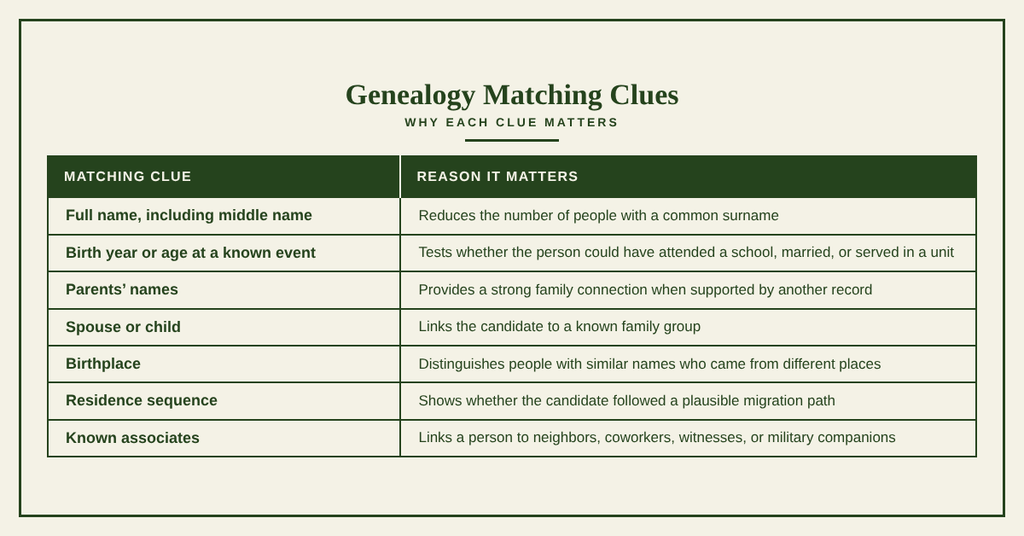
Duplicate ancestor records often appear when one person is listed under a birth surname, a married surname, an alias, and a misspelled surname. Some duplicates also arise when two online trees copied the same unsourced claim. Keep the source records separate until parents, spouse, birthplace, and residence agree. A shared date alone is not enough to merge profiles.
Public Availability and Historical File Requests
Public availability depends on the record type, event date, current state rules, and the office holding the file. A search result, a scanned image, a certified copy, and an original file viewed in person are four different products. Know which one you need before placing an order or traveling to a repository.
County Archives and Public Libraries
Greenville County deeds belong with the Register of Deeds, and Greenville County probate records belong with the Probate Court. County archives and public libraries may hold older court materials, maps, local newspapers, directories, cemetery lists, school records, and private family papers. Collection boundaries vary by office, so a reference desk can prevent wasted travel or duplicate requests.
- Ask which collection holds the record and which years the collection covers.
- Ask whether an index is searchable, whether original books require an appointment, and whether scans are permitted.
- Request the exact volume, book, page, case number, or file number once you have located the index entry.
- Ask whether copy fees apply and whether payment must go directly to the record custodian.
- Bring identification and a written request list when visiting, since many offices cannot hold material without an assigned shelf number.
Library history rooms can also help locate private or local collections that lack online indexes. Their staff may assist with finding aids and machine-readable text, yet the library may not issue a certified copy. Confirm which service the local institution actually provides.
Digitized and Physical Record Retrieval
Digitized genealogy records offer fast viewing, but a file image may differ from the legal record used for a certified order. Physical files can reveal stamps, margin notes, attachments, and handwriting that a flat image may hide. Research results improve when the source type, access date, and file location are saved with each document.
- Open the digital image at the largest available resolution and check the entire page, including the edges and reverse side.
- Save the image file with a clear name that includes the collection, year, book, and page.
- Copy the names, dates, and places exactly as shown before adding a normalized version for searching.
- For a physical retrieval request, list the collection title, volume or case number, date, and page.
- Ask whether the office provides a certified copy, a plain image, or access to the original record.
- Record the date of each request and the response. A later researcher can then tell whether a missing result came from a search failure or a delayed response.
For an original file, confirm the viewing method before arrival. Some offices require the researcher to request material first and present identification when the item arrives. Others pull records only during set hours or require the request to name each file precisely.
Requesting Restricted Historical Copies
Recent birth and death records can carry identity and relationship limits. Marriage, divorce, adoption, guardianship, and other files may have separate rules based on event date, record type, and the requester’s role. The current portal notice and the holding office’s policy control. Read both before sending identity papers or payment.
- Check the portal’s eligibility statement for the exact event type and year.
- Ask which government-issued identification the office accepts.
- Ask whether proof of relationship, a notarized authorization, or a court document is required.
- Request only the documents listed by the custodian, since offices may reject an application that lacks a required item.
- Confirm the fee, payment method, delivery period, and refund policy before placing the order.
- Use the official ordering route rather than sending payment details through an unverified message.
A complete request saves a second round of questions. Include the record collection or type, such as a birth index, death index, marriage record, or another named series. Provide the event details, including the event type, date, county, and state, along with the full names as they appear in the source.
If available, include file identifiers such as a certificate number, book and page, instrument number, or probate case number. Provide the requester’s name, mailing address, telephone number, and email address when required. Add eligibility documents, such as identification, proof of relationship, or authorization, only after the office confirms what it requires.
Record Accuracy and Conflict Resolution
Accuracy comes from preserving source wording, jurisdiction, dates, and uncertainty. A neat family tree can hide errors when the researcher changes a name, merges two people, or chooses one date without recording the disagreement. A clear research trail allows later corrections without losing earlier evidence.
Resolving Variant Spelling Differences
Variant spellings are common in old indexes and handwritten records. A clerk may have spelled a name from a spoken answer, and later indexes may shorten, expand, or misread it. Keep the source form unchanged, then create a separate working form for searching. This protects the evidence while making broader searches possible.
Computer-generated text in digitized indexes can also create false spelling differences. A printed “1” may appear as a letter, and worn type can distort several characters. Compare questionable text with the scanned image or original page. If the image remains unclear, mark the field as unreadable rather than guessing.
Unindexed and Undigitized Archives
A missing surname index does not mean that no record exists. Some Greenville County historical archives contain original books without a name index, while other collections have been digitized only by year or volume. The event may sit inside a chronological register rather than a surname list.
- Set a narrow year and place range based on the family’s known residence.
- Inspect the index headings, abbreviations, and entries that surround a known family member’s name.
- Browse the original chronological volume around the expected date, especially for licenses, returns, and court filings.
- Allow a wider year range because delayed registration can place a birth or death filing in a later year.
- Ask for a film or box list that includes unindexed holdings.
- Ask whether archive staff can search a specific unindexed series and what service charge applies.
Keep search notes for the exact years and pages checked. This prevents repeated work and creates a record that can support a later request for a professional search.
Missing Ancestral File Resolution
A missing ancestral file may reflect an event outside the county, a late registration, a name change, a private record, an unindexed collection, or damage to the original papers. Test each possibility with a documented clue instead of assuming the event never occurred.
- For a missing birth record, check the correct state and county boundary, delayed birth certificates, church registers, and the birth date stated on a later death record.
- For a missing marriage record, check both the license and ceremony series, newspaper announcements, and indexes under each surname used by the couple.
- For a missing death record, check cemetery registers, funeral-home files, church burial books, obituaries, and probate case indexes.
- For a missing probate record, check estate files filed in another county, earlier or later court terms, deed transfers to heirs, and inventories attached to related guardianship cases.
- For a missing census entry, search neighboring enumeration districts, nearby years, property records, and the family’s directory address.
A Repeatable Conflict-Review Method
Keep one row for each claim, source, date, and status. A useful status reflects the evidence rather than the researcher’s hope that a relationship is correct. A claim is considered confirmed when at least two independent records agree and one records the key event. Preserve the citations and source wording to support the finding. A claim is probable when one strong record agrees with several supporting clues. In this case, search for one more record from a different office. A claim is possible when the name, place, or date fits but lacks a strong family connection. Keep the candidate outside the accepted family tree until stronger evidence becomes available.
A claim is conflicted when two records give different dates or relationships. Record both claims and seek the original file to determine which information is more reliable. A claim is unverified when the connection rests on a family story or an unsourced online tree. Locate a primary or independent record to support the connection. These labels serve as working research categories rather than official record classes. They prevent uncertain claims from appearing as settled facts and help identify which records could resolve conflicts or strengthen family relationships.
Contact Details
Use the following contact details for questions about the genealogy search service. Confirm fees, eligibility rules, and retrieval procedures with the record custodian before sending a request.
Frequently Asked Questions
Find quick answers for locating and using genealogy records in Greenville County, South Carolina.
How can I start a Greenville County genealogy search?
Begin with the South Carolina Department of Public Health portal, which holds statewide birth, death, marriage, and divorce indexes. Use the county name filter to narrow results to Greenville. After gathering vital events, visit the Greenville County clerk’s office for deed, probate, and land records. Check local libraries for historical newspapers and city directories. Each source adds clues to build a family profile. Keep notes on source citations to verify later steps in your research.
Where are Greenville County vital records kept?
Vital records for Greenville County are stored with the South Carolina Department of Public Health and the county probate court. The state portal provides online access to birth, death, marriage, and divorce indexes. For original certificates, contact the Greenville County Register of Deeds office during business hours. They can issue copies or direct you to the proper archive. Always have identifying details such as full names and dates to speed the request.
Which site lists South Carolina birth indexes?
The official South Carolina Department of Public Health website hosts searchable birth indexes for all counties, including Greenville. Visit the public records portal, select “Birth Records,” and enter the county name to view available entries. The site updates regularly with newly digitized records. If a record does not appear, consider checking local libraries or the Greenville County Historical Society, which may hold older paper copies.
How do I find probate records in Greenville County?
Probate records reside at the Greenville County Probate Court. Start by calling the clerk’s office to confirm hours and any request forms. You can request wills, estate inventories, and guardianship files by providing the decedent’s full name and approximate death year. Some documents are viewable online through the South Carolina Judicial Department’s public access system. For older cases, visit the county’s historical archives where paper files are stored.
Can I search Greenville County census data online?
Yes, federal and state census schedules that include Greenville County are accessible through major genealogy websites such as Ancestry.com and FamilySearch.org. These platforms allow you to filter by county and year, showing household members, ages, and occupations. Free access is possible at local libraries that subscribe to these databases. For original microfilm, the Greenville County Library System offers on‑site viewing during regular hours.